7.15.2010

Google webmaster tools - Search queries

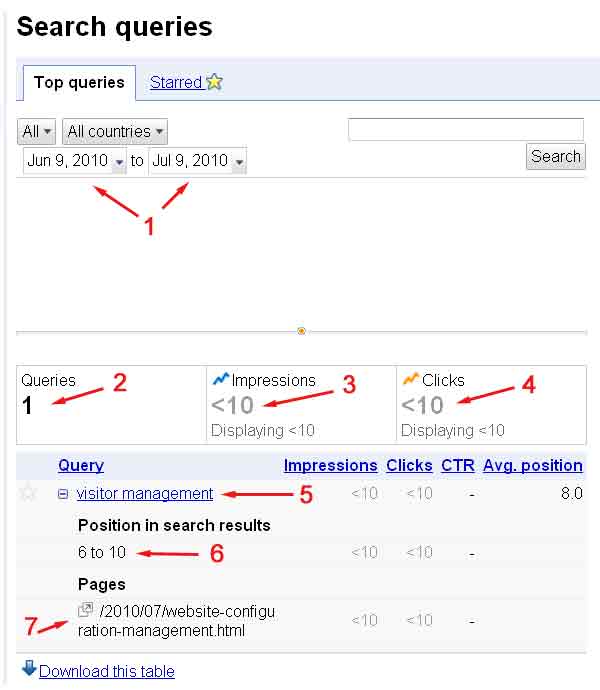
Below is a screen-shot of today's available data for this microenterprise blog on Google Webmaster Tools, Search Queries page. The red numbers one through seven have been added by me for ease of understanding. This page on Google Webmaster Tools provides search data for one day only, July 9, 2010.

The reason for this limited amount of data is the newness of the site registration with Google Webmaster Tools on July 6th. See prior post. Since there is only one day of data available, the date range pointed to by number 1 is fixed in this example.

Presumably, once more data is available, the date range can be user selected. The most important parts of this data set are:
  1. Date range
  2. Total number of search strings that Google considered relevant enough to return, during the date range.
  3. Total number of times the blog appeared in Google search results, during the date range. This is called "impressions" because the Google user would have actually had the opportunity to see the site's title and blurb whether or not the site link was clicked and visited.
  4. Total number of times the site link was clicked and visited from Google search results page.
  5. The specific search string(s) that Google responded to.  In this example, there was only one, "visitor management."
  6. The high-low search position range that Google served as a result for this blog.  Number one is the highest search position, appearing at the top of the list on a Google search results page.  The are generally never more than ten organic search results (not including paid search results) per page with Google, and sometimes less.
  7. The specific page that was considered relevant enough to serve up as a search result.
Google served this blog page, /2010/07/website-configuration-management.html on the first-page results at least twice, but certainly less than ten times, on July 9, 2010. But it was delivered in response to the search query "visitor management," which is fairly irrelevant in the page itself. Google adaptive and self-correcting heuristics will soon eliminate this page for that search inquiry entirely. Indeed, less than four days later, as of today, the blog page is nowhere in sight when that search is repeated.


Screenshot 1 - 20100715-01


Tom Fox
Louisville, Kentucky
Tom Fox on Twitter

7.14.2010

Google webmaster tools - data time lag

I went through the process of verifying ownership of this microenterprise blog of mine with Google Webmaster Tools late evening on July 6, 2010. The first date was returned by Google overnight to be available first thing Monday July 12, 2010. There was one day of data available, and that was for July 9, 2010. It seems, therefore:
  1. There is a 24 to 48 hour delay after registering a new website with Google Webmaster Tools before data begins to be collected.
  2. Once data collection starts, it is prospective only, and accumulates with the passage of time. Historical data prior to the start of data collection is simply not available.
  3. It takes a while before a significant amount of data is collected, for most low-traffic sites. Delaying the set-up is not an advantage here.

Tom Fox
Louisville, Kentucky
Tom Fox on Twitter

7.13.2010

Google's Search Engine Optimization Starter Guide

Nearly two years old now, Google's SEO guide for beginners is a useful free resource in the form of a 22 page printable PDF currently online here. It's a useful overview of technical points that should be understandable to a novice, with a bit of additional web research. A basic understanding of HTML is very useful.

Search Engine Optimization Starter Guide from Google

The topics include:
  • Create unique, accurate page titles
  • Good practices for page title tags
  • Make use of the "description" meta tag
  • Good practices for description meta tags
  • Improve the structure of your URLs
  • Good practices for URL structure
  • Make your site easier to navigate
  • Good practices for site navigation
  • Offer quality content and services
  • Good practices for content
  • Write better anchor text
  • Good practices for anchor text
  • Use heading tags appropriately
  • Good practices for heading tags
  • Optimize your use of images
  • Good practices for images
  • Make effective use of robots.txt
  • Good practices for robots.txt
  • Be aware of rel="nofollow" for links
  • Promote your website in the right ways
  • Good practices for promoting your website
  • Make use of free webmaster tools
  • Take advantage of web analytics services
  • Helpful resources for webmasters

Tom Fox
Louisville, Kentucky
Tom Fox on Twitter

7.12.2010

Webmaster tools - Robots.txt protocol

Webmaster tools
Robots.txt protocol

When a search engine looks at a web site, it checks for a root directory file named 'robots.txt'. A Standard for Robot Exclusion was established in 1994 which the major search engines observe.  It is a method for excluding certain parts of web sites from being scanned and indexed.   The robots.txt protocol is recommended by Google for use by web masters.  The method is not secure and it does not guarantee privacy.

Google Webmaster Central: Block or remove pages using robots.txt file


Tom Fox
Louisville, Kentucky
Tom Fox on Twitter

7.11.2010

Webmaster tools - Lynx web browser

Webmaster tools
Lynx web browser

All commonplace web browsers in use today provide graphical display. That's the modern way. The automated web content explorers, called searchbots or web spiders, used by search engines to map the web are much simpler. The search engines really don't "see" web pages the same way people do, and it is sometimes difficult to appreciate the difference. Yet, when designing a web page with the search engines in mind, understanding the difference can make an important difference.

 The Lynx web browser is a hold-over from a prior computer age when text-only displays were the norm.  Lynx is a text-only web browser that allows you to see a web page much more like how a search engine sees the page.  Lynx is free software that can be downloaded here, but as mentioned, it is a piece of software that operated by a different set of rules, and it may take some effort to understand how it works.

Google specifically recommends the use of Lynx by web masters to understand best design practices better.


Tom Fox
Louisville, Kentucky
Tom Fox on Twitter

7.10.2010

Search engines for beginners - Submitting your site

Search engines for beginners
Submitting your site to major search engines

The market data for June 2010 recently released by Hitwise shows Google still in the North American lead with 71.5% of total searches. Yahoo search and Bing follow with 14.4% and 10% of the total, respectively. Since Yahoo! web search is outsourced to Microsoft's Bing search engine, the two combined amount to a nearly 25% slice of the search engine pie. Ask and ALO search follow in distant fourth and fifth places.

The first step before any search engine can recommend your web site in a search result is for that search engine to know your site exists. The best bet is for you to simply tell the search engine about your site/. The first step is to submit your site, preferably along with a sitemap, to the big three: Google, Yahoo!, and Bing.

The submission process for each is simple, although creating a properly formatted sitemap may take some work.  Here are the links for each:


Each of these search engine submission processes require the creation of a free account and site ownership verification by inserting a specific html <meta> tag, or by uploading a specific html file to the root directory of your hosted web server.

Note for Blogger.com users:  Blogger sites can be verified with Google and Bing web master tools by using <meta> tag inserts, but the code generated by Yahoo! is re-written by Blogger in a way that Yahoo! refuses to read. This blog - microenterprise - was successfully claimed by me through Google Webmaster Tools and Bing Toolbox, but not through Yahoo! Site Explorer.


Tom Fox
Louisville, Kentucky
Tom Fox on Twitter

7.09.2010

Social media data extraction

Social media data extraction
You are expressing an opinion always
. . . and people are watching

Scores and scores of social bookmarking, link shortening, free email, discussion group services and thought patrols are being continuously scanned for links. The data is aggregated, analyzed, bought and sold by the search engineers in quest to connect individual shoppers with the favored sellers.  Your online behavior is being observed and recorded.  Count on it, you are counted.

Those in the know, know.  Seth Godin is known for being in the know. Payola.

Everyone else needs to become aware.

Being watched is nothing to fear. Internet marketing sorta demands attention-seeking behavior. The insider use of data from social media and free internet services is just a fact of modern life. The idea is to be aware of it and use it for your own purposes if possible.


Tom Fox
Louisville, Kentucky
Tom Fox on Twitter

7.08.2010

Website configuration management - setting the baseline

Website configuration management
Setting the baseline for natural search optimization

Search engines such as Google work to provide access to information or resources that individual users are seeking.  A major consideration is relevancy, and the matching mechanism used by Google depends upon key words and phrases.  The quest for useful search results involves much more than returning an undifferentiated list of topical relevancy.  It involves many other considerations such as timeliness, importance, and popularity, to name a few.  Google indicates that it employs more than two hundred factors in creating its search index.

Many of the factors considered by Google to determine the appropriateness and ranking of a particular web page in its search results are wholly within the control and discretion of the individual web master in charge and those who may contribute to the site's content.  More than a few of the factors relate to good web design practices that contribute to a satisfactory user experience.

Google provides a comprehensive and evolving set of design guidelines, best practices, and tools for crafting a web site that rates high on Google's own standard of quality.  Totally apart from a web site's content, its rank in Google's search results can be affected for better or worse based upon wholly technical considerations, and every reasonable effort should be made to conform to Google's quality guidelines.  As happens in judging figure skating competitions, a significant part of a final score consists of "technical merit."


Summary: Configuration management has the focus of establishing rational controls for significant changes to existing systems, whether they be software systems or business systems.  Since a typical small business website is a fairly static event, setting the baseline performance for the site  using Google Webmaster Tools and Google Analytics is a simple and inexpensive matter.  The idea is to capture actual search engine and web visitor behavior data before any changes are made to the website configuration, so that the effects of subsequent changes can be observed. This can be thought of as website configuration management by results.

If the purpose is to improve the business performance of a website by boosting its relevance to Google search, or natural search optimization, then to establish an existing baseline for the search results already being generated seems to be a reasonable priority.


Tom Fox
Louisville, Kentucky

7.06.2010

Ten years of Open Office

OpenOffice.org is both a product and an open-source project. Each have been in existence since 2000.  The source code of the suite was released in July 2000 with the aim of reducing the dominant market share of Microsoft Office by providing a free and open alternative.

The Open Office software suite includes enterprise quality word processing, spreadsheet, database, slide presentation, and drawing applications comparable to Microsoft Office software, but it is free and it is Open Source.  Apart from the very reasonable price for Open Office software (free), the quality of Open Office and the social implications of Open Source software offer compelling justifications to consider the package. In my opinion, Open Office software is first choice for general purpose office use.

For those on a limited budget, there isn't much choice.  Businesses which can well afford to buy Microsoft products ought think about giving financial support of OpenOffice.org instead.

Download Open Office software from this page.


Tom Fox
Louisville, Kentucky
BCTE43JK9HZ9

12.11.2009

Free phone number and free voicemail

Although it is still by invitation only, and I had to wait about 9 months to receive my invitation, I recommend taking a look at Google Voice.

When I finally received my invite, I signed up immediately.  It was necessary to have a phone, or access to a friend's phone, to complete the process, but that;s about it.  I had the opportunity to pick from among several phone numbers in my area code (502 - middle Kentucky, Louisville), for free.  I then set it up so that it did not right through to the phone I borrowed, but rather went directly to the Google voice mail service.

My new phone number is 502-230-1613.

Although I can have calls to that number forwarded to any other phone that I wish, it can also be directed exclusively to voicemail.  The neat thing about Google voice is the automatic transcription from speech to text.  The voice mail messages I receive can be listened to as audio files, but they are also available as email text.

The speech to text conversion is very good, so far.

Another interesting feature is Google call widget (below).  Anyone wishing to call me can use it.  You enter your phone number in the widget data fields and Google places two calls - one to me and one to you, and then connects us.  It is cool.

12.09.2009

Bootstrapping digital goods

A low-cost method of selling digital goods online is provided gt E-junkie.com. I've used the service as a consumer to buy a instant e-book download, which is relatively compact.

E-junkie pricing involves only a monthly subscription fee; with no bandwidth cost, no per transaction fee, or any other hidden fee.  Currently, the minimum monthly subscription fee is $5 per month, which is not payable until after the free 7-day trial period.

The bootstrap strategy is simple.  Line up your ducks so that you can sell at least $5 in digital goods in the first 7 days, during the free trial period, and at least that much every month afterwards, and your fixed costs are covered.