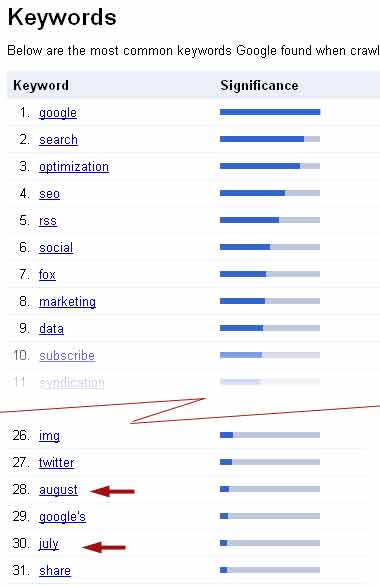
As I mentioned in my post of two weeks ago, Google Webmaster Tools displays, in order of frequency, the keywords that Google search has identified in the collection of indexed pages from a website. For this microEnterprise blog site Google considered the keywords August and July to be significant, listing them each in the top thirty results; 28th and 30th in rank respectively. These months appeared so frequently because I had set the post date format and the archive list format to show date in a verbose format. Nearly all the posts on this blog (89 of 104) so far were posted in those two summer months.
I decided I did not want the dates for posts to affect keyword significance or search results, because of their irrelevance to the content of the posts. I changed the date format displays from verbose to numeric. After nearly two weeks the offending names have dropped from 28th to 31st, and 30th to 38th. I expect that they will continue to drop further as Google proceeds to re-index the various individual post pages over time.
Showing posts with label optimization - testing. Show all posts
Showing posts with label optimization - testing. Show all posts
9.05.2010


8.27.2010
SEO - Check your backlinks with Google Webmaster Tools
Checking your site's back-links with Google Webmaster Tools costs only a little bit of time and effort. Being a free service provided by Google, Webmaster Tools belongs in any bootstrapper's web toolbox. You can check the links that Google has found to your site from around the web, assuming that you installed and verified ownership of you site with Google about two months ago.
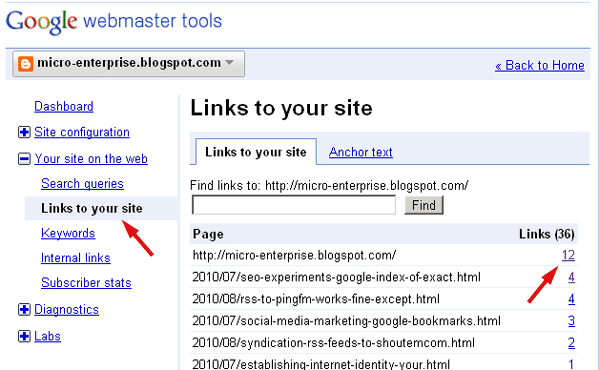
Once at the dashboard for your site in Webmaster Tools, It is three-click steps to begin learning who links to your web site. The screenshot below shows the first two clicks:
First click: Under the right sidebar menu item "Your site on the web", click "Links to your site."
Second click: Next, see the numbers in the far right column and click one.
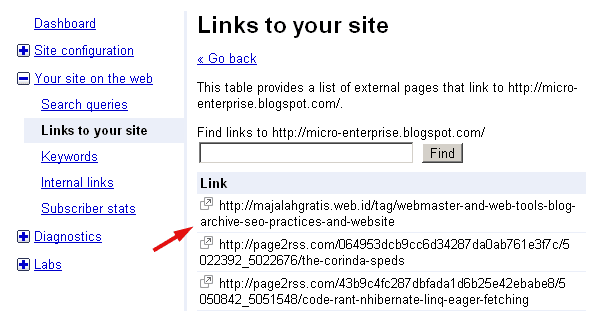
Third click: Then, on the detail page of backlinks as shown in the screenshot below, select one of the links and go see who likes you.
Once at the dashboard for your site in Webmaster Tools, It is three-click steps to begin learning who links to your web site. The screenshot below shows the first two clicks:
First click: Under the right sidebar menu item "Your site on the web", click "Links to your site."
Second click: Next, see the numbers in the far right column and click one.
Third click: Then, on the detail page of backlinks as shown in the screenshot below, select one of the links and go see who likes you.
8.24.2010
Webmaster Tools - Keyword view
Google Webmaster Tools shows the significant keywords of a site, as seen by the Google search index. This will depend in large part upon which pages or posts that Google has actually crawled and indexed. Rarely is it every page.
Apart from the question if Google sees as much of your site as you wish it to, there is the issue of how Google sees a site. The Google Webmaster Tools keyword data is a useful way to discover keywords you do not want to be given Google search significance. The screenshot below shows the resent keyword results for this blog after seven weeks, eighty posts, and 80 percent of the posts being indexed.
As you can see the red arrows point to "august" and "july" being counted as keywords in the top thirty of the most significant. This is not what I want, and it comes as a surprise. The month in which a post was written has little is any relevance to the content of the posts.
Now that I am aware of the problem, I can investigate it and devise a remedy.
To me it looks like the cause of this problem was my blog setting choices for date formats. I opted for a verbose display, with the names of the months spelled out for each blog post and for the blog archive display. It is a simple matter to change these settings so that dates are displayed in a purely numeric format. Actually doing that immediately changes the date format on the blog posts, but so far it seems to have had no effect upon the blog archive date format.
It makes sense to me that part of keyword optimization is to eliminate the keywords you do not want.

Apart from the question if Google sees as much of your site as you wish it to, there is the issue of how Google sees a site. The Google Webmaster Tools keyword data is a useful way to discover keywords you do not want to be given Google search significance. The screenshot below shows the resent keyword results for this blog after seven weeks, eighty posts, and 80 percent of the posts being indexed.
As you can see the red arrows point to "august" and "july" being counted as keywords in the top thirty of the most significant. This is not what I want, and it comes as a surprise. The month in which a post was written has little is any relevance to the content of the posts.
Now that I am aware of the problem, I can investigate it and devise a remedy.
To me it looks like the cause of this problem was my blog setting choices for date formats. I opted for a verbose display, with the names of the months spelled out for each blog post and for the blog archive display. It is a simple matter to change these settings so that dates are displayed in a purely numeric format. Actually doing that immediately changes the date format on the blog posts, but so far it seems to have had no effect upon the blog archive date format.
It makes sense to me that part of keyword optimization is to eliminate the keywords you do not want.
7.25.2010
SEO experiments - Google index of Google Bookmark comments
So far there is no indication that Google indexes and serves the comments attached to Google Bookmarks links. This doesn't mean that Google ignores those links or comments entirely, but how they are used by Google remains unknown to me. It is a matter for speculative inquiry, patience, and more SEO experiments..

SEO experiments - Google index of exact quotes
In these three preceding posts I demonstrated to my own satisfaction at least that Google indexes the ALT text contained within HTML IMG tags, but that Microsoft Bing does not. Yahoo! search results are unavailable for the simple reason that Yahoo! has not indexed any of the posts on this blog more recent than a year ago.
I used two unique phrase descriptions in the ALT text portion of the IMG tag for two different screenshots contained within two different posts. I then included these exact text phrases in subsequent postings to this blog.
I will not repeat those two text phrases here in this post for fear of screwing things up even more.
Today when I do a Google search on those two phrases I still find confirmation that Google does indeed index ALT text, it also uses ALT text to return on an exact quote search.
The first search item returned in the second test example resulted from an index hit on the ALT text contained with an IMG tag.
The second SEO test example also shows how an RSS feed of this blog on another site can produce odd and unpredictable results with Google. Why Google does what it does the way it does it is a continuing puzzle. The only thing I'm sure of is when I repeat these two search experiments again tomorrow, the results will be different from today..
SEO experiment - Example 1

SEO experiment - Example 2

- Site Optimization - using img alt tags
- Site optimization - additional test of img alt tag text
- SEO - img ALT text on Bing and Yahoo! search
I used two unique phrase descriptions in the ALT text portion of the IMG tag for two different screenshots contained within two different posts. I then included these exact text phrases in subsequent postings to this blog.
I will not repeat those two text phrases here in this post for fear of screwing things up even more.
Today when I do a Google search on those two phrases I still find confirmation that Google does indeed index ALT text, it also uses ALT text to return on an exact quote search.
The first search item returned in the second test example resulted from an index hit on the ALT text contained with an IMG tag.
The second SEO test example also shows how an RSS feed of this blog on another site can produce odd and unpredictable results with Google. Why Google does what it does the way it does it is a continuing puzzle. The only thing I'm sure of is when I repeat these two search experiments again tomorrow, the results will be different from today..
SEO experiment - Example 1
SEO experiment - Example 2
7.24.2010
Site optimization - additional test of img alt tag text
Copy and paste
"Screenshot of W3C Accessibility Guidelines page July 23, 2010 - 600px"
(including the quotation marks)
. . . into Google search and see if the previous post is indexed. Of course, this post may also be indexed by Google for that specific phrase too. alt="Screenshot of W3C Accessibility Guidelines page July 23, 2010 - 600px" was included in the <img> tag for the screenshot in the last post.
Related posts:
SEO experiments - Google index of exact quotes
Site Optimization - using img alt tags
SEO - img ALT text on Bing and Yahoo! search
"Screenshot of W3C Accessibility Guidelines page July 23, 2010 - 600px"
(including the quotation marks)
. . . into Google search and see if the previous post is indexed. Of course, this post may also be indexed by Google for that specific phrase too. alt="Screenshot of W3C Accessibility Guidelines page July 23, 2010 - 600px" was included in the <img> tag for the screenshot in the last post.
Related posts:
Subscribe to:
Posts (Atom)


 Posts
Posts

