8.31.2010

Two social media types

My brief and unscientific survey of all things pertaining to functioning social media sites excluded subscription AOL, music sites, photo sites, and video sites. Otherwise, they are all listed here on my Syndication Feed Lab page.

It's just a list. Don't bother making sense of it all. It is an incomplete list.

My first focus of interest was how these sites inter-operate and connect though feeds, APIs, and widgets, in actual practice. I'm almost positive I've learned something over the last few weeks, but it is a busy marketplace and things keep shifting as I watch. You'd think these folks would take a vacation now and then.

This more technical interest of mine was in service of the Internet Marketing gods, and I discovered two types of social media sites.
  1. Social media sites that are inhabited, and
  2. Social media sites that are uninhabited.
It is a fairly obvious distinction once one browses for groups, friends, followers, fans, or co-conspirators. The opportunity to make new friends is there, or it is not. Most of these sites provide the opportunity to invite my existing friends to the site, and even strongly encourage it. The philosophy seems to be, "If I can't spam my friends, who can I spam?"

But, what's the point of that? I already know my friends and have established reliable means of communicating with them, and I'm not talking about Facebook. Not that I would ever spam my friends beyond their level of tolerance anyway.

Syndication + social media = opportunity. It is the opportunity to smooze, make new friends, and distribute content to a wider audience. The smoozing and making friends part is critical to the success of the operation.

On the other hand IROTWS (I Read On The Web Somewhere) an offer to "Build a network of trusted friends for you!"

How the heck does that work? "Trusted friends by proxy" does not seem to compute.

From my spam filter - instant karma

"Instant gratification is the only necessary precondition for instant karma."

So, two to five months is too long to wait for a five-figure monthly income? The following screenshot of a spam email today is appealing to a sense of desperation. The reason I used a screenshot rather than copying and pasting the text is to avoid polluting the search index of this blog with spammy language. The language of spam has a definite flavor and tone to it.

Screenshot of smap email

The punchline was the disclaimer at the bottom of the page.

"ATTENTION: I send ads for many different marketers for many different income opportunities. I don't have the time or resources to investigate each opportunity to be sure that it is legitimate. Therefore, I don't endorse any of the opportunities. Be sure that you investigate the opportunity before you become involved."

8.30.2010

Claiming my own marketing back yard with a hobby

Louisville, Kentucky, is not a big city, but it is big enough to have distinct sections and neighborhoods.  I happen to live in Old Louisville, which is a historic preservation district containing more Victorian era residences than any other.  I've lived here for a bit more than a year now. This spring into summer, before the weather became so brutally hot, I moseyed, sauntered and wandered around my new neighborhood with a digital camera taking snapshots.  Photography has been a hobby of mine since high school. I took a lot of them, and I massaged them with Photoshop.

I intend to use these photographs to create a blog that will weld my name 'Tom Fox' with my local stomping grounds, 'Old Louisville.'  It may take as long as a year to accomplish, but I'm not in any rush.  I plan to use Seth Godin's 'drip' strategy, by daily posts of a new image with a street address. According to theory, this will burn the connection into Google's digital brain.

You can see my Old Louisville photos here. http://old-louisville.blogspot.com/

Once a day, every day, for the next 365 days, at least one new Old Louisville photograph will be posted on that blog.  The key phrase is "Old Louisville," and for some reason I want to own it.

I think it will work, but there is only one way to find out for sure, and that is to do it.  Since photography really is my hobby and I've already done the photo & Photoshop part just for fun, taking it this next step is fairly easy. If I had to pay someone else to do all the work, I could never afford it.

This is a form of search engine optimization, as a subset of search engine marketing.  If anyone is searching for things related to 'Old Louisville," I want them to find me. I still need to devise a way to connect and interact with those who visit that blog.  I suppose that would be classified as a variant of social marketing.

8.29.2010

Enabling Google Gmail Web Clips

I don't have much of an opinion about Google's Gmail Web Clips, so don't consider this to be a recommendation. I am very curious about what Google is up to in general, and Web Clips drew my attention because it revolves around syndicated feeds, and I have just started to look into it. So far it looks heavily slanted toward the display of paid advertising, but I still need to mess with it some more before trashing it.

Enabling Web Clips is easy and reversible. There is a Web Clips tab on the Gmail Settings screen.  It  is also possible to add an RSS feed to the list, but that part hasn't been so easy yet.

Screenshot of Google Gmail WebClips setup procedure

8.28.2010

Private social networks for business - Yammer

Yammer.com is a hosted enterprise microblogging platform that has an entry level for free, and advanced levels that are not for free. The buzz words and catch phrases are:
  • Company social network
  • Collaboration tool
  • Knowledge base
  • Productivity tool
  • Mobile tool
One registers for the Yammer service with a company email address. Only people with a verified company email address can join a company network. When I attempted to join using my Yahoo! email address, it was refused.

"You've entered an email address that was not assigned by your employer. Yammer is only available for users with valid company email addresses. If you have a company email address, please Sign Up using that email address, so we can connect you with your network."

8.27.2010

SEO - Check your backlinks with Google Webmaster Tools

Checking your site's back-links with Google Webmaster Tools costs only a little bit of time and effort. Being a free service provided by Google, Webmaster Tools belongs in any bootstrapper's web toolbox. You can check the links that Google has found to your site from around the web, assuming that you installed and verified ownership of you site with Google about two months ago.

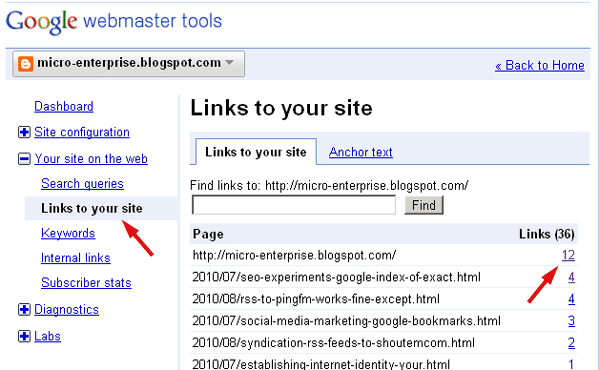
Once at the dashboard for your site in Webmaster Tools, It is three-click steps to begin learning who links to your web site. The screenshot below shows the first two clicks:

First click: Under the right sidebar menu item "Your site on the web", click "Links to your site."

Second click: Next, see the numbers in the far right column and click one.

Screenshot of Google Webmaster Tools *Links to Your Site* Page

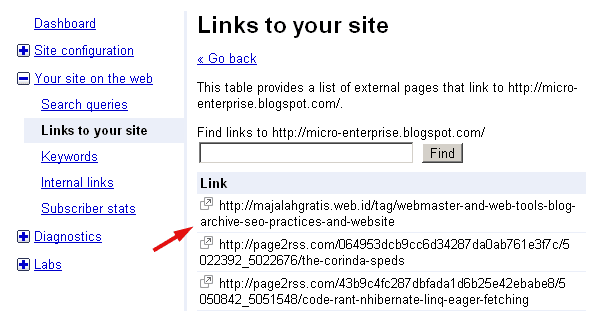
Third click: Then, on the detail page of backlinks as shown in the screenshot below, select one of the links and go see who likes you.


Screenshot of Google Webmaster Tools *Links to Your Site* second page

8.25.2010

Web optimization and diminishing marginal returns

Professor Paul Samuelson stated the law of diminishing marginal returns is one of the most famous laws in all of Western economic theory. In simplest terms the law of diminishing returns means that you can throw twice as many resources at a problem, but you should not expect to necessarily get twice the results you want. This is one of the central messages of Seth Godin's book Permission Marketing.

Godin begins that book by observing in recent decades consumer oriented businesses have spent more and increasingly more money on mass-market advertising, but with decreasing effectiveness. In part this is explained by the economic principle of diminishing marginal returns. It's not the only factor in play, but it is an important one.

The idea of diminishing marginal returns is especially important for small business owners to consider when contemplating directing scarce resources toward web site optimization. Of course every small business web site owner wants more business, but the ever present questions are, how much does acquiring one more customer cost, and is it worth it?

8.24.2010

Deleting or editing blog posts

Somewhere along my searching the web I got the strong impression others think it a bad idea to ever edit or delete a blog post, regardless how crappy or irrelevant it is. Here are two quick examples. Rewriting blog history: Bad idea, and Advice: Never delete a blog post. A more balanced view is expressed by Dave Taylor in Should you ever edit or delete blog entries? There are others in a similar vein.

I take a contrarian view of the situation. Elimination is an essential part of every healthy living process, on a micro level.  On a larger system level, everything is recycled and ultimately incorporated somewhere else if it has persistent value, or it is transformed.

Some think of the internet as a historical record, but that is not the way I view it.

Google maintains a site-wide keyword ranking as well as a page-specific keyword rank. I know this is true because Google Webmaster Tools reports these numbers and shows them to me in a graph. Although it is not clear to me how Google uses these site-wide keyword ranking, I know I'm not alone in my ignorance. But sometimes an extraneous series of posts may skew Google site-wide view of my web sites in a keyword direction I don't like. Eliminating the non-focused posts altogether may be the quickest solution to improve search performance, in my opinion.

But, I feel strongly about it. Especially when the abundance of my own verbosity on subject no longer of any interest to me are involved, and when they distort how search engines view the subject matter of my own blogs.  I have also written about it here.

Webmaster Tools - Keyword view

Google Webmaster Tools shows the significant keywords of a site, as seen by the Google search index. This will depend in large part upon which pages or posts that Google has actually crawled and indexed. Rarely is it every page.

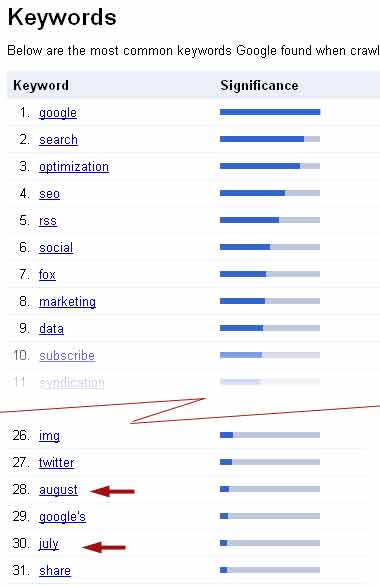
Apart from the question if Google sees as much of your site as you wish it to, there is the issue of how Google sees a site.  The Google Webmaster Tools keyword data is a useful way to discover keywords you do not want to be given Google search significance. The screenshot below shows the resent keyword results for this blog after seven weeks, eighty posts, and 80 percent of the posts being indexed.

As you can see the red arrows point to "august" and "july" being counted as keywords in the top thirty of the most significant. This is not what I want, and it comes as a surprise. The month in which a post was written has little is any relevance to the content of the posts.
screenshot of Webmaster Tools site keyword data

Now that I am aware of the problem, I can investigate it and devise a remedy.

To me it looks like the cause of this problem was my blog setting choices for date formats.  I opted for a verbose display, with the names of the months spelled out for each blog post and for the blog archive display. It is a simple matter to change these settings so that dates are displayed in a purely numeric format. Actually doing that immediately changes the date format on the blog posts, but so far it seems to have had no effect upon the blog archive date format.

It makes sense to me that part of keyword optimization is to eliminate the keywords you do not want.

screenshot of blog page showing source of unwanted keywords

8.23.2010

Google Analytics - Visitor loyalty

One of the standard reports available to me through the use of Google Analytics on this blog is a count of return visits by the same computer, presumably representing a single individual.  The recent incarnation of this blog was six weeks old on August 17. The screen shot below shows the Google Analytics Visitor Loyalty graph of this blog for the period July 6 through August 17. Analytics counted a total of 726 blog-wide visits during that time span.

Google explains the loyalty graph this way.
"Loyal visitors are usually highly engaged with your brand and a high number of multiple visits indicates good customer and visitor retention. A high number of new visitors (i.e. those at the top of the table) indicates strong visitor recruitment. On this histogram, your most loyal visitors are shown on the bottom and your new and least loyal visitors are shown at the top." 
People either like this blog and return, or they don't and they stay away.  That much is simple. It's useful to know the percentages.

Screenshot of Google Analytics Visitor Loyalty graph

8.22.2010

Google's social media platform

Google's social media platform is so obvious it took me two months to see it.

The center of Goggle's monster social media contender is the profile page. Here's mine. It has a unique personalized URL, www.google.com/profiles/tomwfox. Parts are public and other parts are totally or partially private, as selected.

Compared to Facebook, The Google profile page "About me" and "Contact info" present the same type of information as does Facebook's Info Page. The Google profile page "About me" is invariably public it seems, but the "Contact info" is not public. You specify which people or groups of contacts can see it. The Google profile page "Buzz" tab is the functional equivalent to the Facebook Wall. Although I haven't looked at it closely, it seems that Google's Latitude competes with Facebook's newly announced social local mobile feature.

Google's continuing integration of Blogger, Picasa (photo hosting), Google Reader (Feed reader and sharing), and other platforms already easily matches the capabilities of Facebook, but just constructed out of previously independent parts. Facebook is more like a big lump compared to Google's structural and functional integration.

It just keeps getting better.